
Package Tracking overview
What is Amazon Business’ package tracking solution?
Amazon Business provides a package tracking solution that enables you, as an integrator or developer, to monitor Amazon Business package statuses through the following mechanisms:
- Push notification
- API integration
With this solution, you can develop applications that allow you to track Amazon Business package shipments in real time.
Benefits of Amazon Business’ package tracking solution
The Amazon Business package tracking solution provides the following benefits:
Enhanced package visibility
This solution delivers real-time updates through both the Package Tracking API and push notification, which can be seamlessly integrated into external systems. Together, the push notification and API provide comprehensive shipment status updates throughout a package’s fulfillment journey.
Simplified setup process
You can onboard to the Package Tracking API or enable push notifications through a one-time configuration. Once integrated, this solution eliminates the need for you or your customers to repeatedly log into the Amazon Business website to monitor package status. Instead, status can be monitored through automated tracking functionality directly in your application.
Improved operational efficiency
By implementing real-time package updates in your applications, you can lower customer service costs and avoid back-and-forth with Amazon Business to relay package tracking to your end users.
Hybrid solution to package tracking
Amazon Business offers both push and pull solutions through the Package Tracking API and push notification. These different solutions give you flexibility to build your integration according to your preference.
How package tracking works
When an Amazon Business order is placed, you can leverage the Package Tracking API or push notification to retrieve real-time package status.
Package Tracking API
Package Tracking API supports the following operation:
| Operation | Method | Path | Description |
|---|---|---|---|
getPackageTrackingDetails | GET | GET /ab-tracking/2025-07-02/orders/{orderId}/shipments/{shipmentId}/packages/{packageId} | Returns detailed tracking information for a package. |
After a successful request, the API returns a detailed update on the package status, including the package’s current status and an array of all milestone updates throughout the package’s shipping journey. For more information, see Retrieving package tracking details.
Push notification
Push notifications are sent to your specified webhook URL whenever a supported package tracking event occurs. Each notification contains the timestamp of the tracking event and IDs that can be used to call other Amazon Business APIs for further information about the order, such as Package Tracking API, Ordering API, and Reporting API. For more information, see Package tracking push notifications.
Available regions
The package tracking solution is available in the following regions and marketplaces:
| Region | Marketplaces |
|---|---|
| NA | US, CA, MX |
| EU | UK, DE, FR, IT, ES, IN |
| FE | JP |
Implementation scenarios
Amazon Business’ package tracking information can be implemented in multiple ways. Here are three example scenarios:
Scenario 1: Non-UI Applications
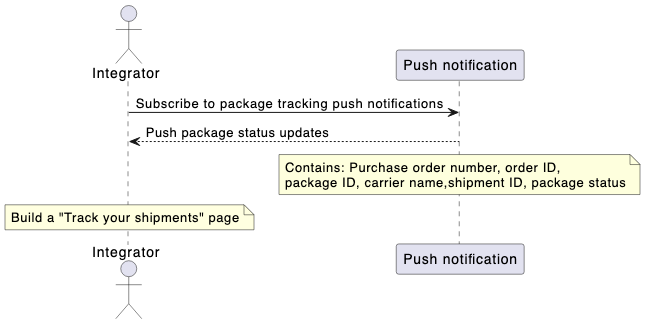
The package tracking push notification can support use cases that do not involve a user interface (UI). Examples include email notification systems, internal workflow triggers, and automated status updates based on real-time shipment notifications.
Scenario 2: UI-Based Applications
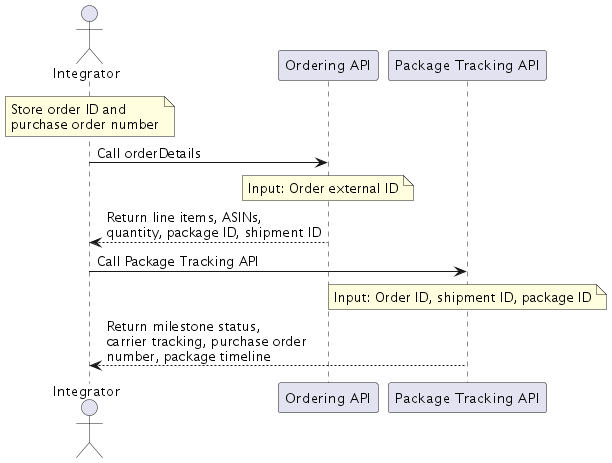
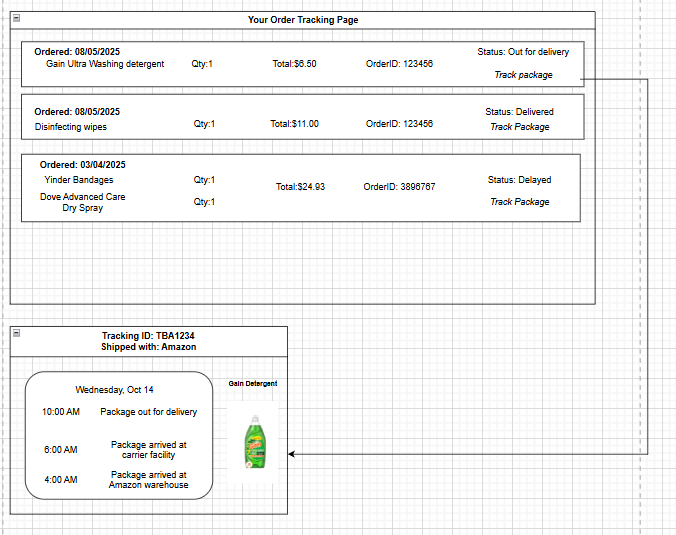
The Package Tracking API can be used to help build customer-facing shipment tracking interfaces. Depending on your use cases, you can use Ordering API to extract a customer’s order and shipment information. With these details, you can call Package Tracking API to display granular shipping details. For example, to build a UI similar to the below visual, perform the following steps:
- Call the Ordering API
orderDetailsoperation to retrieve an order’spackageId,shipmentId, andorderId, as well as line item details such as its ASIN and quantity. - Use the
packageId,shipmentId, andorderIdfrom Step 1 to call Package Tracking API. The API vends the latest tracking status in thetrackingStatusfield. Use this field to build top-level “Status” fields in your UI. To provide timeline visibility of a package’s journey over time, use thepackageTrackingEventsobject of the API response. For detailed specifications, see Package Tracking API reference.
Alternative approach
You can also use the Reporting API
getShipmentLineItemReportsoperation to retrieve thepackageId,shipmentId, andorderIdrequired to call Package Tracking API. However, this operation is not recommended for building a package tracking UI, as it does not provide real-time updates.
Sample UI
Scenario 3: Hybrid approach
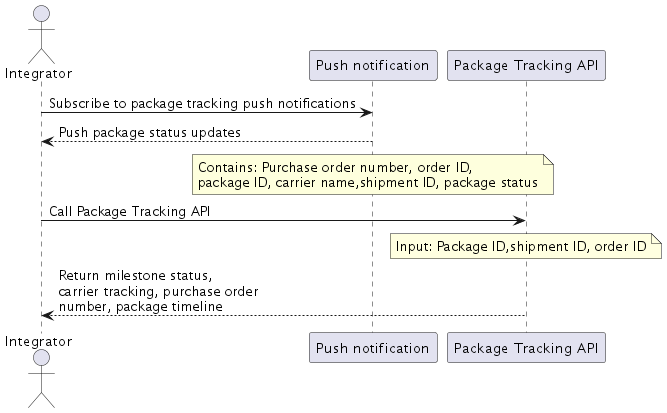
You can use both the Package Tracking API and push notification in a hybrid model. Instead of pulling shipping details on a schedule, this scenario uses the push notification as an event-based trigger for your system to call the Package Tracking API. Each push notification contains the required IDs to call the API, including the package ID, shipment ID, and order ID, so your system can call the API whenever you receive a notification. This model allows you to retrieve granular shipping data through an automated workflow.
Onboarding
To onboard to the Amazon Business package tracking solution, see the following guides to integrate with the API and push notification:
Updated 2 months ago