
Manage Listings Issues
Learn how to identify, retrieve, and troubleshoot Listings issues.
The Listings Items API provides programmatic access to selling partner listings on Amazon. You can create, edit, delete, and retrieve details about Amazon listings (SKUs) for a selling partner. This includes product facts (such as item titles) and sales terms (such as price and inventory). When working with the Listings Items API, you may encounter issues during listing creation, updates, or validation. This guide shows you how to identify, retrieve, and resolve these issues.
What are Listings Issues?
Within the listing experience, you can access issues during different parts of the process. When you submit data with the Listings Items API, Amazon performs validations that return responses synchronously or asynchronously.
Synchronous validation provides immediate feedback that prevents acceptance and further processing of the submission. If the submission passes the initial synchronous validations, the submission is accepted and is sent downstream to create or update the SKU. However, Accepted does not mean the process is complete. Multiple downstream processes create the item in the Amazon catalog, and any of these processes can generate issues that return asynchronously. During this processing, Amazon validates the submitted data against existing content and returns listings issues asynchronously.
It is crucial to effectively manage both synchronous and asynchronous issues to ensure smooth listing operations.
Issue types
There are two types of issues:
- Synchronous issues: Occur when the server rejects the initial submission and you can see the errors immediately. These cover input data validations, such as missing required attributes and invalid attributes.
- Asynchronous issues: Occur after a request passes initial validation but fail during downstream processing. These issues return as detailed messages with resolution guidance.
Access Listings issues
Listings issues are accessed through the following mechanisms:
- Direct API responses: Retrieve issues directly in the API responses for synchronous Listings Items API submissions that prevented acceptance.
- Direct API requests: Use the
getListingsItem(single SKU) orsearchListingsItems(multiple SKUs) operations with theincludedData=issuesparameter to retrieve issue details about a single or multiple listings. JSON_LISTINGS_FEEDprocessing reports: Access feed processing reports for theJSON_LISTINGS_FEEDsubmissions through the Feeds API, which include both synchronous and asynchronous issues.- Notifications: Subscribe to asynchronous
LISTINGS_ITEM_ISSUES_CHANGEnotifications to receive near real-time updates when the listings item issues change after making the submission.
Best practices to prevent Listings issues
The following sections help you understand how to prevent and handle listing errors effectively.
Pre-validate your Listings payload using the Product Type Definitions API
Listings data submitted to the Listings Items API must conform to the JSON Schema format provided by the Selling Partner API for Product Type Definitions. Use the Product Type Definitions API to retrieve the latest JSON schema for a product type. Validate your payload against the meta-schema before submission. Verify required and conditionally required attributes, as dynamic conditions may change requirements based on other attribute values. Review the allOf property in the product type JSON schema to identify conditional requirements.
For more guidance, refer to the following resources:
- JSON schema support documentation.
- JSON schema tools for rendering user interfaces and validating listings data.
- Tutorial videos on using Product Type Definitions API to create and validate product JSON schemas.
- Selling Partner Listings sample application on GitHub demonstrates an end-to-end listings experience for managing common listings use cases. It features a dynamic UI implementation based on the product type JSON schema and provides a mini Seller Central experience where you can add, delete, update, and test your listings. Refer to the video tutorial to set up and install the application.
Preview listing errors using Validation Preview mode feature
Important
This mode has lower rate limits and is intended for testing a small number of listings. It is not designed for production workflows.
The VALIDATION_PREVIEW feature in the Listings Items API provides a test environment to identify asynchronous errors that could prevent a listing from being created or updated, without persisting the data in production.
When you use the Validation Preview mode of the Listings Items API, the error codes in the issues array of the response are updated. The validation logic remains functionally equivalent, but error codes change to reflect our enhanced validation system.
Action required
- Review your error handling logic: If your application parses or matches specific error codes from Validation Preview responses, update your code to handle both current and new error codes.
- Update error code mappings: Use the reference table below to map current error codes to their new equivalents in your application.
- Test with Validation Preview: We recommend testing your integration with the Validation Preview mode of the Listings Items API to observe the new error codes and ensure your application handles them correctly.
- Monitor your integration: Monitor your Validation Preview requests to identify any unexpected behavior.
The following table shows the mapping between current error codes and new error codes:
| Current error code | New error code | Validation rule |
|---|---|---|
| 90000640 | 90242 | Less than value rule violated |
| 90000642 | 90195 | Max precision rule violated |
| 8333 | 90244 | Invalid enumerated attribute value |
| 90000691 | 90004207 | Diff less than or equal to attribute rule violated |
| 100334 | 5886 | Generic ASIN merchant not authorized |
| 90004114 | 90114 | Min value rule violated |
| 90004118 | 90194 | Pattern rule violated |
| 90001217 | 90004200 | Missing fabric type material percentage |
| 90004401 | 99022 | Attribute field min occurs rule violated |
| 90000644 | 90232 | Max scale rule violated |
| 90004117 | 99016 | Max occurs rule violated |
| 90000595 | 90230 | Same value rule violated |
| 90003944 | 99022 | Attribute field min occurs with precondition rule violated |
| 90004145 | 90225 | Max length rule violated |
| 90001132 | 90196 | No URLs rule violated |
| 90003951 | 90248 | Attribute field max occurs zero with precondition rule violated |
| 90004115 | 90197 | Max value rule violated |
| 90003859 | 90004201 | Invalid fabric type structure |
| 90000596 | 90193 | Less than attribute rule violated |
| 90004144 | 90226 | Min length rule violated |
| 90000643 | 99028 | Min scale rule violated |
| 90004385 | 100398 | SKU violated with mix intent |
| 90006958 | 100339 | Illegal markup |
| 90001214 | 90004199 | Invalid fabric type material order |
| 5461 | 5995 | Merchant not authorized to update |
| 90001212 | 90003907 | Fabric type total sum violation |
| 90000639 | 90221 | Greater than value rule violated |
| 90004147 | 100095 | Invalid value detected |
| 90003945 | 90004205 | Invalid enumerated attribute value with precondition |
| 100333 | 5887 | Generic ASIN merchant authorization blocked |
| 90004119 | 90188 | Invalid UCCID ISBN checksum |
| 100364 | 100336 | Min measurement value violation |
| 90001214 | 90147 | Less than or equal to attribute rule violated |
The following is an example of current Validation Preview response:
{
  "issues": [
    {
      "code": "90004145",
      "message": "The value provided for 'item_name' exceeds the maximum length of 200 characters.",
      "severity": "ERROR",
      "attributeName": "item_name"
    }
  ]
}
The following is an example of Validation Preview response change:
{
  "issues": [
    {
      "code": "90225",
      "message": "The value provided for 'item_name' exceeds the maximum length of 200 characters.",
      "severity": "ERROR",
      "attributeName": "item_name"
    }
  ]
}
Considerations
- Validation Preview mode only: These changes affect only the Validation Preview mode (
mode=VALIDATION_PREVIEW) of the Listings Items API. Standard submission modes are not impacted. - Validation logic unchanged: The underlying validation rules remain the same; only the error codes are changing.
- Message text may vary: While error codes are changing, the error messages may also be refined for clarity.
- Backward compatibility: We support both current and new error codes to ensure smooth operation.
- No action required for most integrations: If your application does not parse or match specific error codes, no changes are needed.
Pricing validation issues
Validation Preview mode surfaces pricing validation issues in addition to catalog and attribute validation. It also detects these pricing issues before submission, so you can fix them proactively.
When you submit a price change using mode=VALIDATION_PREVIEW, the response issues array includes pricing-related issues with the INVALID_PRICE category.
The following table lists the pricing issues returned in Validation Preview mode. Issue 100708 is new to Validation Preview. Issues 19038, 19037, and 18701 are also returned in the asynchronous Listings API workflow, and are now surfaced in Validation Preview mode.
| Code | Severity | Category | Description | New |
|---|---|---|---|---|
100708 | WARNING | INVALID_PRICE | Not eligible to be the Featured Offer due to uncompetitive price. Set your price at or below the Competitive External Price to become eligible for the Featured Offer. | Yes |
19038 | ERROR | INVALID_PRICE | Your selling price is higher than your maximum price setting. Review and adjust either your selling price or maximum price. | No |
19037 | ERROR | INVALID_PRICE | Your selling price is lower than your minimum price setting. Review and adjust either your selling price or minimum price. | No |
18701 | ERROR | INVALID_PRICE | The selling price was identified as a potential high pricing error. Please review, and confirm or update your price. | No |
Important
WARNINGseverity issues (such as100708) do not prevent the listing update. The update is accepted, but the offer may not be eligible for the Featured Offer.ERRORseverity issues prevent the listing update. Fix the price and resubmit.- Issue
18701occurs when one price type on the offer has a pricing error, and flags other price types on the same offer.
The following is an example of a Validation Preview request with a price change:
PATCH https://sellingpartnerapi-na.amazon.com/listings/2021-08-01/items/AXXXXXXXXXXXXX/MY-SKU-123?marketplaceIds=ATVPDKIKX0DER&issueLocale=en_US&mode=VALIDATION_PREVIEW
{
  "productType": "PRODUCT",
  "patches": [
    {
      "op": "replace",
      "path": "/attributes/purchasable_offer",
      "value": [
        {
          "marketplace_id": "ATVPDKIKX0DER",
          "currency": "USD",
          "our_price": [
            {
              "schedule": [
                {
                  "value_with_tax": 90.00
                }
              ]
            }
          ]
        }
      ]
    }
  ]
}
The following is an example of a Validation Preview response with a pricing issue:
{
  "sku": "MY-SKU-123",
  "status": "VALID",
  "submissionId": "b2a45cb931234faea118fa24001f8a6f",
  "issues": [
    {
      "code": "100708",
      "message": "Not eligible to be the Featured Offer due to uncompetitive price. You can set your price at or below the Competitive External Price to become eligible to be the Featured Offer",
      "severity": "WARNING",
      "attributeNames": [
        "our_price"
      ],
      "categories": [
        "INVALID_ATTRIBUTE",
        "INVALID_PRICE"
      ]
    }
  ]
}
Note
A
statusofVALIDwithWARNING-level pricing issues means the listing update is accepted, but the offer may not be eligible for the Featured Offer. AstatusofINVALIDwithERROR-level pricing issues means the listing update is rejected.
Refer to the following tutorials for more information on previewing errors for a listing before submission:
- Preview errors before creating or fully updating a listing
- Preview errors before partially updating a listing
Configure event-driven error handling
Subscribe to the LISTINGS_ITEM_ISSUES_CHANGE notifications to receive near real-time updates when issues on your Selling Partners' listings are created, fixed, or updated.
Each notification payload includes key listing identifiers such as SKU, along with related issue Severities, and EnforcementActions caused by issues. Implement event handlers to consume these notifications and call appropriate API operations (for example, getListingsItem or searchListingsItems) to retrieve detailed listings issues data based on the reported severities and actions.
This event-driven architecture eliminates the need for continuous polling, reduces direct API call volume, and enables faster detection of listing issues.
The following is an example of notification payload:
{
  "NotificationVersion":"1.0",
  "NotificationType":"LISTINGS_ITEM_ISSUES_CHANGE",
  "PayloadVersion":"2023-12-13",
  "EventTime":"2021-02-03T18:59:30.194Z",
  "Payload":{
        "SellerId": "AXXXXXXXXXXXXX",
        "MarketplaceId": "ATVPDKIKX0DER",
        "Asin": "TEST",
        "Sku": "TEST",
        "Severities": [
            "ERROR",
            "WARNING"
    ],
    "EnforcementActions": [
      "SEARCH_SUPPRESSED",
      "LISTING_SUPPRESSED",
      "ATTRIBUTE_SUPPRESSED",
      "CATALOG_ITEM_REMOVED"
    ]
  },
  "NotificationMetadata":{
        "ApplicationId":"amzn1.sellerapps.app.f1234566-aaec-55a6-b123-bcb752069ec5",
        "SubscriptionId":"93b098e1-c42-2f45-93a1-78910a6a8369",
        "PublishTime":"2021-02-03T18:59:30.194Z",
        "NotificationId":"0e999936-da2c-4f9c-9fc2-02b67bae5f49"
    }
}
Use enhanced JSON Processing Report feature for bulk monitoring
By default, the JSON_LISTINGS_FEED processing report only includes a list of synchronous issues that prevented acceptance of the submissions. To retrieve a complete list of both synchronous and asynchronous processing issues, specify the issues parameter in the includedData property in the feed header when constructing a JSON feed payload.
The following is an example of a JSON feed with requested issues property set:
{
  "header": {
    "sellerId": "{{sellerId}}",
    "version": "2.0",
    "issueLocale": "en_US",
    "report": {
      "includedData": [
        "issues"
      ],
      "apiVersion": "2021-08-01"
    }
  },
  "messages": [
    {},{}
  ]
}
When you request issues in a JSON_LISTINGS_FEED submission, Amazon generates the processing report only after processing all feed items. You can use this feature to request other details (for example, summaries or attributes) about the listings item. Ensure that you pass only the information you need to optimize for the processing time. To request additional data in the enhanced processing reports, refer to the JSON_LISTINGS_FEED Processing report schema for the schema of the feed type and other available options.
Troubleshoot Listings Item Issues
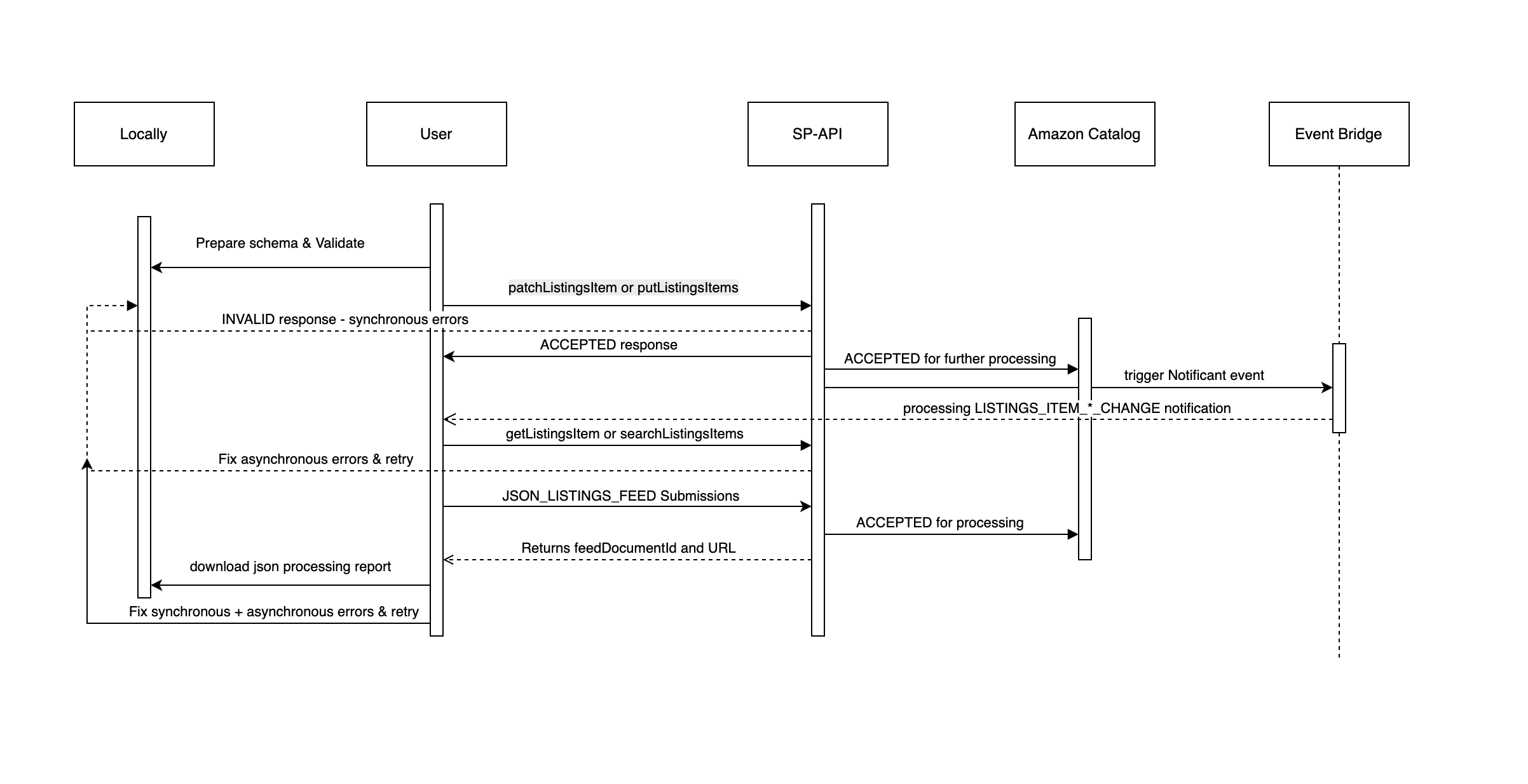
The following diagram provides an overview of the workflow steps to handle listings item issues.
Note
In most cases, implementing one best practice might not be enough. Combine multiple approaches (notifications, bulk operations, direct API calls) to effectively manage listings issues and reduce call volume.
Follow the steps to troubleshoot listings submission issues:
- Identify the selling partner SKU with issues that need to be resolved.
- If you need to inspect existing issues, call the
getListingsItemoperation with the identified SKU. Ensure that you includeissuesin theincludedDataparameter to retrieve a list of existing errors.- You can also use the
searchListingsItemsto retrieve information about multiple listings based on SKU, ASIN, or supported identifier. Refer to Search for listings items by product identifier or other listings parameters tutorial to learn more.
- You can also use the
- Review the
issuesobject to inspect the associated listings issue. Verify thecategoriesto understand the types of issues category and review theenforcementsactions. Prioritize fixing issues that could impact the status of the selling partner listings. Address the critical issues relevant to your use case, then resubmit the corrected listing data. Refer to the Listings Items API reference documentation to see applicable values for issues, categories, and enforcement actions. - For the
JSON_LISTINGS_FEED, download and review the processing report after each upload. If you have requested an enhanced processing report in the feed submission, you will receive processing report only after Amazon validates and processes all the items present in the feed message. - For ongoing monitoring and automation, instead of repeatedly calling direct API operations, subscribe to asynchronous
LISTINGS_ITEM_ISSUES_CHANGEand theLISTINGS_ITEM_STATUS_CHANGEnotifications to receive listings issues reported after making the submission. Then inspect the information received in the notifications payload and call further APIs, if necessary.
For information on synchronous listings issues examples and preventative actions, refer to the Listings Items API Issues troubleshooting guide. To understand common asynchronous error messages, their definitions, and suggested solutions, refer to the Error code explanations in the Seller Central.
If you would like to share feedback on the error or report defects with errors, open a case with our developer support team.
Updated 9 days ago